|
|
image.png (69,677 bytes) |
|
|
Hi YK, We can not understand your request. 1. Check if it works in Taiwan >> Check which part? What is the value of skb.mode? In current situation, we didn't use Taiwan network to check SKB UI. 2. Check if it works after connecting VPN from Taiwan to Korea What is the value of skb.mode? 0 ? In current situation, if we want to use Korean VPN to check SKB UI, the value of skb.mode is 0 3. Will there be a problem in the 3PL test environment? ( can you give me your opinion? ) I don't know, please let us know the value of skb.mode should be set in different scenario. Thanks, Jason |
|
|
HI Jason To check the VCS operation, press the Homebutton and check if the HomeMenu is displayed. 1. Check if it works in Taiwan >> Check which part? What is the value of skb.mode? Please set skb.mode to 1 and check 2. Check if it works after connecting VPN from Taiwan to Korea > What is the value of skb.mode? 0 ? Please set skb.mode to 0 and 1 Thank you YK.Jung |
|
|
Hi YK, 1. Check if it works in Taiwan >>Please set skb.mode to 1 and check Check with the following steps, a). login SKB account with Korean VPN (skb.mode 0) b). Confirm that HomeMenu is displayed correctly. c). set skb.mode as 1 and connect Taiwan network then reboot devices Result: HomeMenu is displayed correctly 2. Check if it works after connecting VPN from Taiwan to Korea > >Please set skb.mode to 0 and 1 a). Base on #1 test, the current skb.mode is 1, then connect to Korean VPN network and reboot devices Result: Confirm that HomeMenu has problem, please refer to Korean VPN_Skbmode1.png b). set skb.mode to 0 and reboot devices (current network is still Korean VPN) Result: HomeMenu is displayed correctly Additional information: the UI is very lag when I operate RCU, and I can NOT find app list entry. Thanks, Jason |
|
|
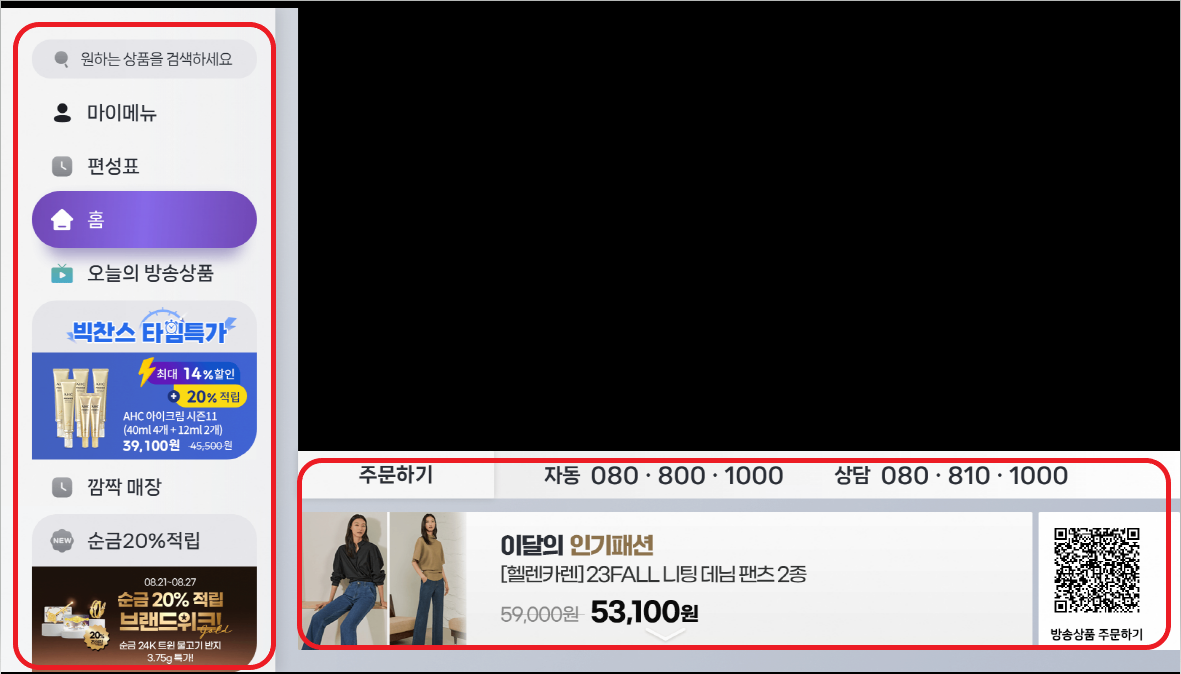
HI Jason Thank you for the confirmation. And there are two additional confirmation requests from SKB. 1) After applying VCS, FXN should be able to proceed with Google test/approval. => The VCS is not perfect right now, but first of all, it is working as HomeUI, so Google's approval is likely to be possible. Minor functionality of the menu will be resolved later So I don't think there's a problem. Please let me know if you have any other opinions. 2) After applying VCS, the operation speed should be faster in relation to HomeUI abroad than before and It should also operate normally. => when I test it here, the menu is working faster than the UI540. (my opinions) However, SKB is asking if it is the same overseas. > Please check the menu operation speed for UI540 (v15.540.16) and UI541 (v15.541.1). Is it similar or which is faster? , Please let me know your opinion. * After logging in, please set skb.mode to 1 and test it after connecting to the Taiwan network. * After logging in, please set skb.mode to 0 and test it after connecting to Korean VPN network > If you go to channel 17 from UI541 (v15.541.1) FW, SK Store home shopping channel is broadcasting. Maybe you won't be able to see LiveChannel broadcasts overseas, but the shopping-related selection page should be displayed. (Bottom/right) Please check if this part is displayed. (17_SKStore.PNG , please check if the marked part in red is displayed. ) Please also check if the operation of this part is the same as UI540. * After logging in, please set skb.mode to 1 and test it after connecting to the Taiwan network. * After logging in, please set skb.mode to 0 and test it after connecting to Korean VPN network > There is also a request to check whether VoD is running normally in UI541 overseas. I tested it here and found that VoD is not being purchased. Therefore, after entering the HomeUI , make sure that the video/Audio is automatically played ( HomeMenuVodPlay.mp4 ) * After logging in, please set skb.mode to 1 and test it after connecting to the Taiwan network. * After logging in, please set skb.mode to 0 and test it after connecting to Korean VPN network Thank you YK.Jung HomeMenuVodPlay.mp4 (2,275,265 bytes) |
|
|
Hi Jason SKB/SKT is currently requesting confirmation of VCS related overseas operations. ( include non-VCS , that is UI540 ) Please check the above content (https://mantis.cnsbg.foxconn.com/vaas/view.php?id=1797#c13967) In addition, among the above contents >> There is also a request to check whether VoD is running normally in UI541 overseas. > I tested it here and found that VoD is not being purchased. > Therefore, after entering the HomeUI , make sure that the video/Audio is automatically played ( HomeMenuVodPlay.mp4 ) > * After logging in, please set skb.mode to 1 and test it after connecting to the Taiwan network. > * After logging in, please set skb.mode to 0 and test it after connecting to Korean VPN network UI541 seems that VoD is not working well. so please check if VoD works well in UI540. Please check as soon as possible. Thank you YK.Jung |
|
|
Hi Jason It is becoming an issue in SKB that VoD cannot play overseas. first , please check the following. 1) Please use UI540(v15.540.16) version for test FW 2) After logging in, please set persist.sys.skb.mode to 1 and reboot / test it after connecting to the Taiwan network. Please check if YouTube can be played normally 3) Please try to play VoD (Instead of playing automatically, please select the actual VoD and play it.) I heard yesterday that it doesn't work because of net_reset. Please send me the log of the status of the issue. Thank you YK.Jung |
|
|
Hi YK, >>It is becoming an issue in SKB that VoD cannot play overseas. >>first , please check the following. >>1) Please use UI540(v15.540.16) version for test FW >>2) After logging in, please set persist.sys.skb.mode to 1 and reboot / test it after connecting to the Taiwan network. >> Please check if YouTube can be played normally Can NOT enter HomeUI, net_reset dialog keeps showing up When I plug-out Ethernet cable, the native UI will be displayed, I can enter the YouTube, but the Youtube will show network error, then I insert Ethernet cable, Youtube can be played normally. >>3) Please try to play VoD (Instead of playing automatically, please select the actual VoD and play it.) Can NOT test it, because net_reset dialog keeps showing up. >> I heard yesterday that it doesn't work because of net_reset. >> Please send me the log of the status of the issue. Please refer to 15.540.16_net_reset_logcat.txt Thanks, Jason |
|
|
Hi Jason The previous feedback is as follows. https://mantis.cnsbg.foxconn.com/vaas/view.php?id=1797#c13953 >>> 1. Check if it works in Taiwan >>> >>Please set skb.mode to 1 and check >>> Check with the following steps, >>> a). login SKB account with Korean VPN (skb.mode 0) >>> b). Confirm that HomeMenu is displayed correctly. >>> c). set skb.mode as 1 and connect Taiwan network then reboot devices >>> Result: HomeMenu is displayed correctly You said "HomeMenu is displayed correctly" in UI541 Therefore, I think the UI540 HomeMenu will work normally... Am I misunderstanding something? Do you know what the difference is? Thanks YK.Jung |
|
|
Hi YK, >>You said "HomeMenu is displayed correctly" in UI541 >>Therefore, I think the UI540 HomeMenu will work normally... >>Am I misunderstanding something? I just checked again. Same test steps: 1. login SKB account with Korean VPN (skb.mode is default value, I think is null) 2. Confirm the HomeUI can be displayed correctly after login 3. set skb.mode 1 and change to Taiwan network cable then reboot device 4-1 .UI540, I can NOT enter HomeUI, net_reset dialog keeps showing up 4-2. UI541, I can enter HomeUI and operate it. >>Do you know what the difference is? I don't know. Thanks, Jason |
|
|
Hi YK, I need to correct my test result UI540: After reboot with skb.mode 1 (Taiwan network). The screen shows network_error immediately. UI541: After reboot with skb.mode 1 (Taiwan network). The screen shows HomeUI correctly, I can operate it, then I leave the device for a while. I'll see the black screen and 40001/50001 message in the bottom, then I will see the network error dialog Thanks, Jason |
|
|
Hi YK, I uploaded UI541 log Please refer to 15.541.101_net_reset_logcat.txt Thanks, Jason |
|
|
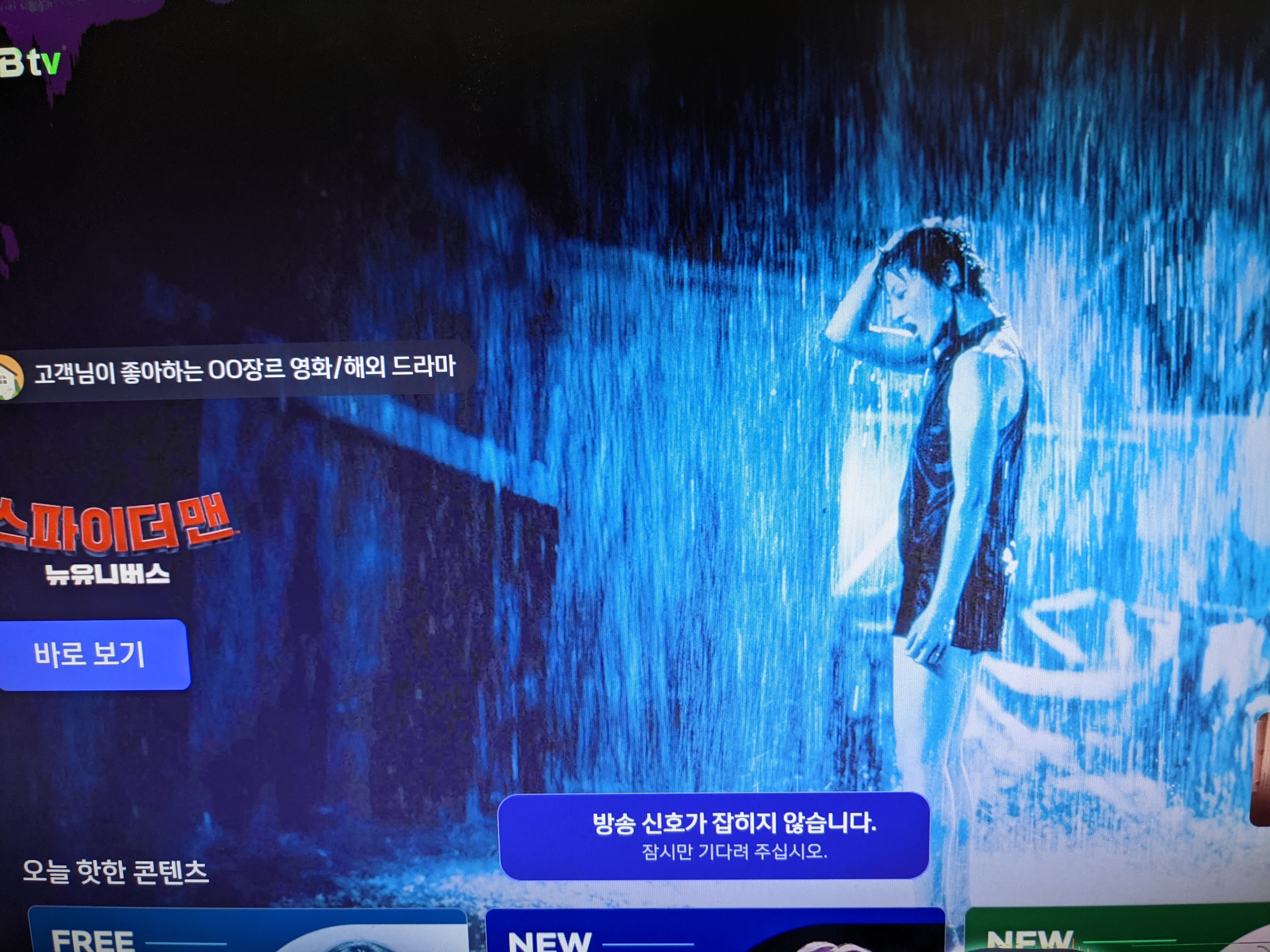
Hi YK, >> If you go to channel 17 from UI541 (v15.541.1) FW, SK Store home shopping channel is broadcasting. >> Maybe you won't be able to see LiveChannel broadcasts overseas, but the shopping-related selection page should be displayed. (Bottom/right) >> Please check if this part is displayed. (17_SKStore.PNG , please check if the marked part in red is displayed. ) I used your VPN (ALT's VPN), HomeUI can be displayed correctly. But after I change to channel 17, I can not see the red region as you said. Please refer to Channel17.txt Thanks, Jason |
|
|
Hi YK, Regarding VOD testing in UI541 We can play it by Korean VPN (Please refer to UI541_Vod.mp4) But sometimes we see the 47001 message. (Under Korean VPN, Please refer to 47001.mp4) Thanks, Jason UI541_Vod.mp4 (18,046,224 bytes) 47001.mp4 (5,116,776 bytes) |
|
|
Hi YK, >>1) After applying VCS, FXN should be able to proceed with Google test/approval. >> => The VCS is not perfect right now, but first of all, it is working as HomeUI, so Google's approval is likely to be possible. >> Minor functionality of the menu will be resolved later >> So I don't think there's a problem. >> Please let me know if you have any other opinions. How to go to app list page? How can we verify notification event? where is the bell icon ? Thanks, Jason |
|
|
Hi Jason This app should be tested today because the URL will change after a day. Test Environment - Use version v15.540.16. - Install the attached apk. iptvPlayerBTF_0907_03.apk 1) Test without VPN - persist.sys.skb.mode 1 - reboot - Execute the following commands after boot completion adb shell am start com.sptek.stb.iptvplayer2 * Check if the ad video is played (Please wait at least 3 to 4 minutes.) 2) Test after connecting VPN to Korea - persist.sys.skb.mode 0 - reboot - Execute the following commands after boot completion adb shell am start com.sptek.stb.iptvplayer2 * Check if the ad video is played (please wait at least 3 to 4 minutes.) 3) Check to see if it works on Taiwan's home network It could be a special case of FXN network If there is no problem with 1), This test is not necessary. - persist.sys.skb.mode 1 - reboot - Execute the following commands after boot completion adb shell am start com.sptek.stb.iptvplayer2 * Check if the ad video is played (Please wait at least 3 to 4 minutes.) Could you check it ? Thank you YK.Jung |
|
|
Hi YK, 1) Test without VPN (Taiwan network) We can NOT see HomeUI (see network reset message), after I start player, the screen showed the URL, then the movie trailer will play in 3 seconds. 2) Test with ALT (Korean) VPN We can see HomeUI, After I started the player, the screen showed the URL, then the screen went black, I waited for over 5 minutes and I still couldn't see the movie trailer. Please refer to logcat. Thanks, Jason |
|
|
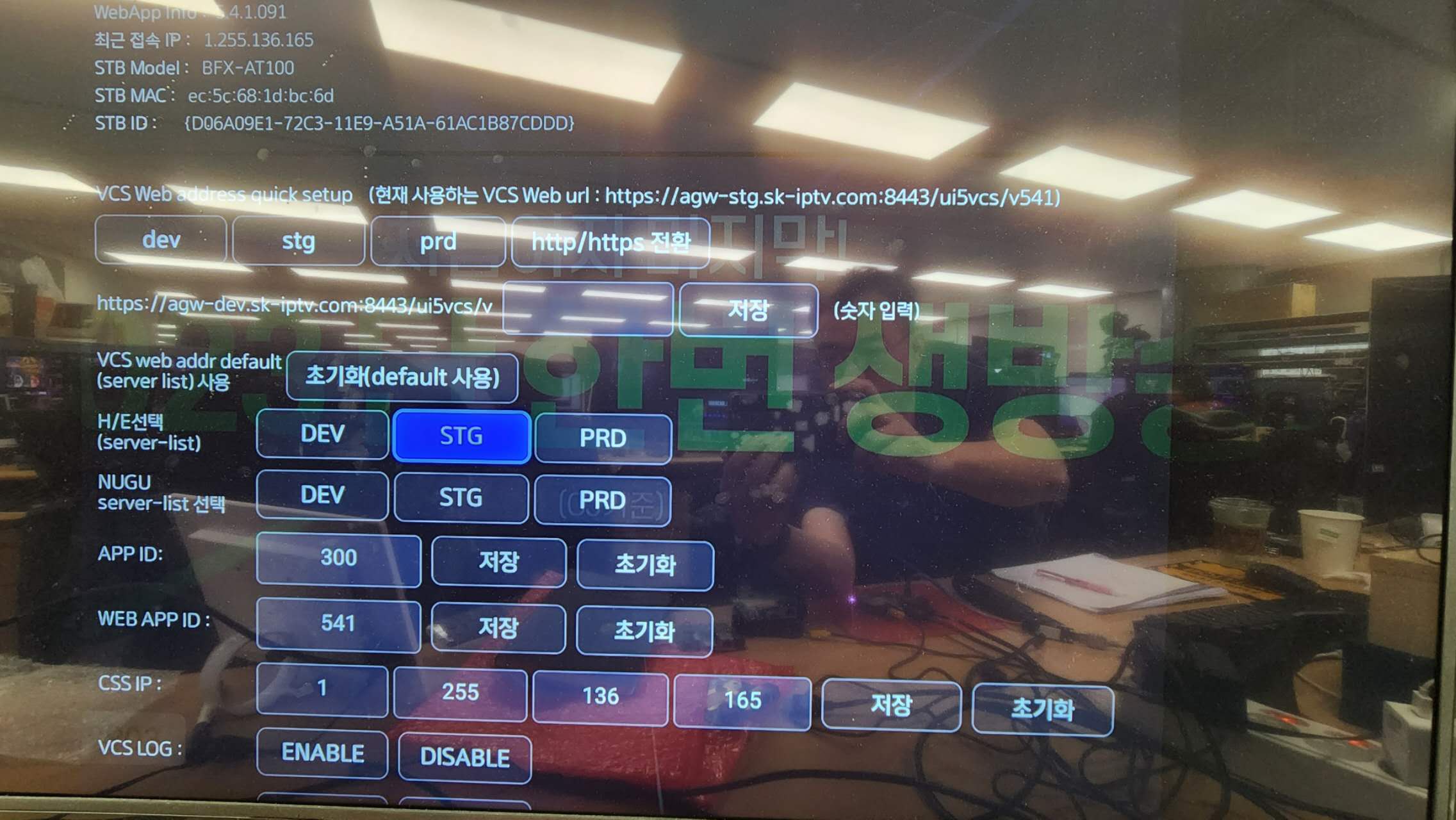
Hi Jason, SKB wants to verify the VCS FW is working correctly in overseas. I have already tested it with japan VPN and it works fine. And SKB wants to verify in oversea network. So, Please test newest VCS FW (15.541.12) with Taiwan network. As discussed in this ticket, you may check that the home UI is working and that the VOD plays well. You may already know this, but I'll share the VCS server settings. 1. Press *0323# 2. Set "stg" in VCS Web address quick setup 3. input 541 and press "저장" 4. Set "STG" in "H/E선택 (server-list)" 5. input "300" in APP ID 6. input 541 in WEB APP ID 7. input "1.255.102.56" in CSS IP 8. reboot device Thank you. Kim image-3.png (128,289 bytes) |
|
|
Hi JunGyu, How to handle persist.sys.skb.mode ? Please let us know the skb.mode and which network should I use? For example: the skb.mode and network for login SKB account is ? the skb.mode and network for after login SKB account is ? Thanks, Jason |
|
|
Hi Jason, You can test as follow : 1. login SKB account with Korean VPN (skb.mode is default value, I think is null) 2. Confirm the HomeUI can be displayed correctly after login 3. set skb.mode 1 and change to Taiwan network cable then reboot device Thank you. Kim |
|
|
Hi JunGyu, Test Version: 15.541.12 with Taiwan network. HomeUI: we can see the homeUI VOD: As discussed on wechat. we ignore this test case temporary. Thanks, Jason |
|
|
Hi Jason SKB wants to check whether it is operating slowly or normally. Please take a video of the operation of the Taiwan network with VCS FW ( 15.541.12 ) - menu scrolling - menu Navigation - VoD play Thank you YK.Jung |
|
|
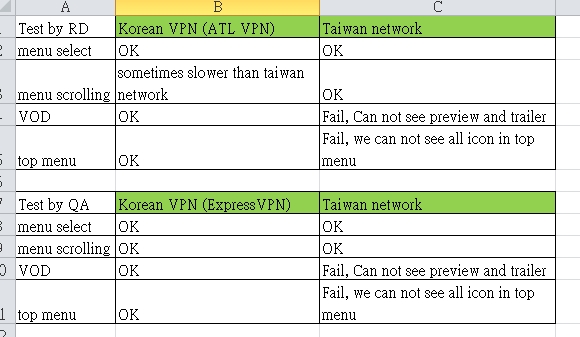
Hi Jason For example, please capture the video as follows. - menu_select_test.mp4 - menu_scrolling_test.mp4 - Vod_play_test.mp4 "도시범죄 2" Please test each in the following test environment 1) FXN Google Test environment. ( Is this environment the same as the 3PL test environment? , VCS FW should be fine with 3PL testing.) 2) Taiwan network environment Thank you YK.Jung menu_scrolling_test.mp4 (6,545,512 bytes) Vod_play_test.mp4 (26,315,287 bytes) menu_select_test.mp4 (7,165,651 bytes) |
|
|
Hi YK, Please refer to the attachments, they are captured from our QA (Taiwan network). Our QA office is in another location. Thanks, Jason 1-1_QA_menu_scrolling.mp4 (13,861,273 bytes) 1-3_QA_menu_select.mp4 (14,503,322 bytes) 1-2_QA_VOD.mp4 (5,985,889 bytes) |
|
|
Hi YK, Please refer to the attachments, they are captured by me (Taiwan network). In my Taiwan network, I can not see the preview video on poster card, please refer to 2-2_RD_VOD.mp4 and logcat (preview.txt) I also can not play 3 min trailer, please refer to 3_trailer. >> ( Is this environment the same as the 3PL test environment? , VCS FW should be fine with 3PL testing.) I can not confirm 3PL's network. it was established by their IT manager. Thanks, Jason 2-1_RD_menu_scrolling.mp4 (4,801,757 bytes) 2-3_RD_menu_select.mp4 (7,921,761 bytes) 2-2_RD_VOD.mp4 (6,895,862 bytes) |
|
|
Hi Jason The CSSIP was created by SKB for overseas use. Please change CSSIP as follow to check how it works CSSIP : 1.255.136.165 Test FW : v15.541.16 at FXN-QA - Please check it after connecting to Korea via VPN. - Please check it without using a VPN Please let me know if there are any symptoms that are different from before when you change CSSIP Thank you YK.Jung cbab474b26b29d6cf6700f53e6ee635.jpg (216,040 bytes) |
|
|
Hi Jason One more thing Please check if the top menu is displayed properly ( The attached picture has an issue , each ICON should be displayed ) Thank you YK.Jung |
|
|
Hi YK, Please refer to 20231101.jpg By the way, In Taiwan network, when we press Home, the top menu will loading, after a few seconds, the top menu shows the empty icon. If the top menu loading has NOT been completed, we cannot press the arrow keys. (It looks like the top menu can't fetch the image and we need to wait for a timeout to occur) Thanks, Jason 20231101.jpg (109,184 bytes) |
|
|
Hi Jason Thank you for the update YK.Jung |
- yk.jung ( (ALTech) Younkwang Jung ) developer
.png)
.png)

.png)
.png)